
AI Agent Management
Chatbot Configuration
Configure your AI chatbot, customize behavior with system prompts, select AI models, adjust settings, and test in the Playground before deployment.
Overview
The Chatbot section is the central hub for configuring your AI agent's behavior, personality, and capabilities. Here you can define how your agent thinks, responds, and interacts with users.
Whether you're building a customer support bot, a sales assistant, or a technical documentation helper, proper chatbot configuration is essential for delivering accurate, on-brand responses.
System Prompt Engineering
Define your agent's role, personality, tone, and constraints with clear instructions
Model Selection
Choose from GPT-4o, Claude 3.5 Sonnet, and other leading AI models for your use case
Real-time Testing
Test changes instantly in the Playground without affecting your live deployment
Branding & Customization
Customize appearance, colors, logo, and welcome messages to match your brand
System Prompt & Instructions
The system prompt (also called instructions) is the most important factor in shaping your AI agent's behavior. It defines your agent's role, personality, tone, constraints, and how it should format responses.
A well-crafted system prompt ensures consistent, on-brand responses that align with your business goals and user expectations.
Key Elements of a Good System Prompt:
1. Role Definition
Clearly state what the agent is and what it does.
2. Tone & Personality
Specify how the agent should communicate (friendly, professional, technical, etc.)
3. Constraints & Boundaries
Define what the agent should NOT do or topics to avoid.
4. Formatting Instructions
Specify how responses should be structured (bullets, numbered lists, code blocks, etc.)
AI Model Selection
Docimal supports multiple AI model providers and tiers, allowing you to balance speed, cost, and capability for your specific use case.
Available Models: GPT-4o, GPT-4o mini, GPT-4, GPT-4 Turbo, Claude 3.5 Sonnet, Claude 3 Opus, Claude 3 Haiku, Gemini 1.5 Pro, and more.
Model Comparison:
| Model | Best For | Speed | Cost |
|---|---|---|---|
| GPT-4o | Balanced reasoning & speed, general purpose | Fast | Medium |
| GPT-4o mini | High-volume customer support, FAQs | Very Fast | Low |
| Claude 3.5 Sonnet | Content creation, creative writing, complex reasoning | Fast | Medium-High |
| Claude 3 Opus | Advanced research, technical support, multi-step reasoning | Moderate | High |
| Claude 3 Haiku | Fast responses, simple queries, high throughput | Very Fast | Very Low |
Chatbot Settings
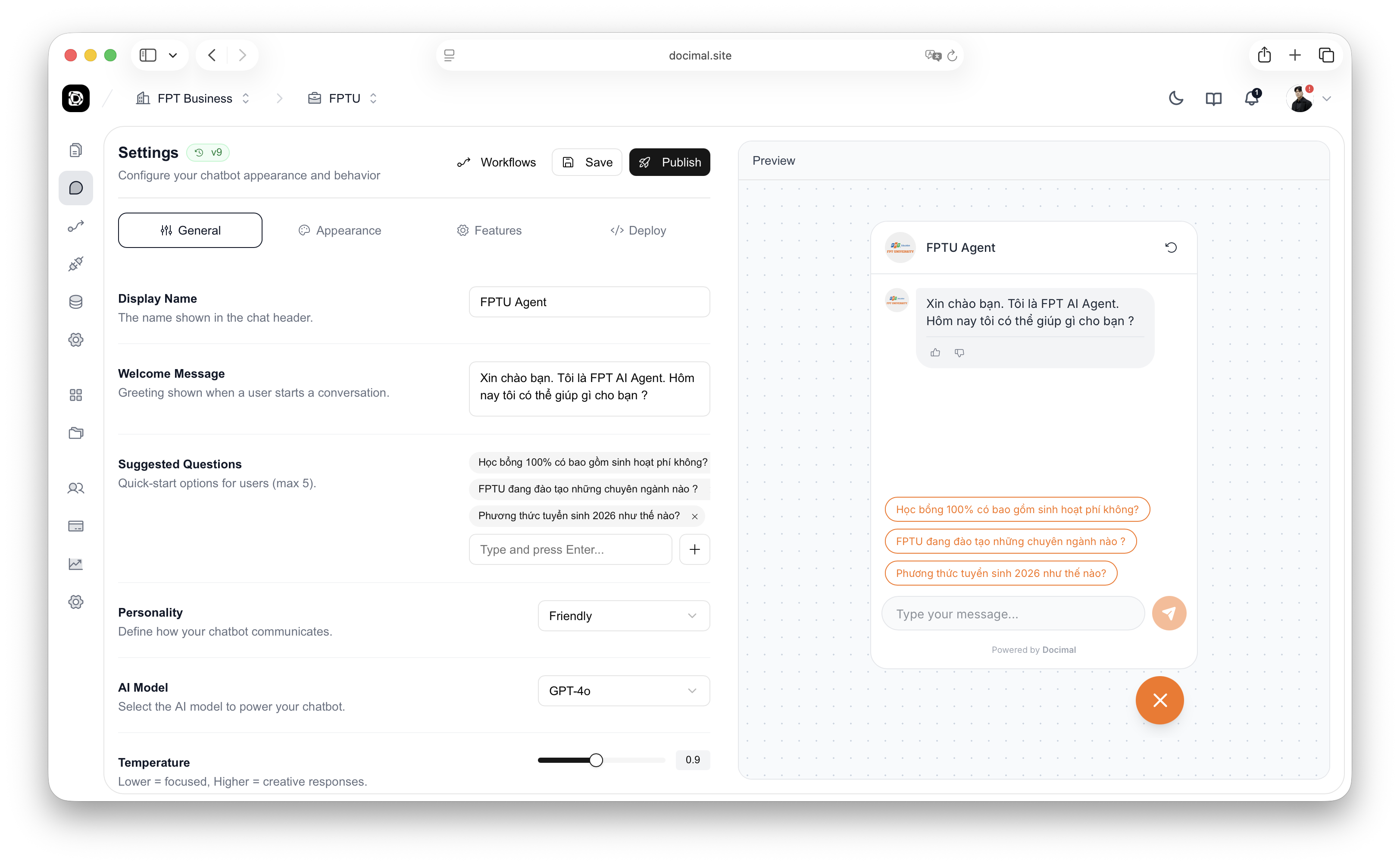
Fine-tune your chatbot's behavior with these configuration options:
Temperature (0.0 - 1.0)
Controls randomness and creativity in responses. Lower values (0.0-0.3) are deterministic and factual. Higher values (0.7-1.0) are more creative and varied.
Max Tokens
Maximum length of each response. Set lower for concise answers, higher for detailed explanations.
Context Window
Number of previous messages the agent remembers. Higher values maintain context longer but consume more tokens.
Knowledge Base Priority
Control which knowledge bases are used and in what order. Q&A pairs typically have highest priority, followed by uploaded documents, then website content.
Fallback Behavior
Define what happens when the agent can't answer from the knowledge base: admit uncertainty, transfer to human, or use general knowledge.
Testing in the Playground
The Playground is Docimal's interactive testing environment where you can chat with your AI agent in real-time, test different configurations, and verify responses before deploying to production.
Access the Playground from the "Test" or "Playground" tab in your chatbot dashboard.
Real-time Testing
Send messages and receive instant responses just like your end users will experience
Source Inspection
See exactly which documents and passages your AI agent references for each answer
Quick Adjustments
Modify system prompts, temperature, and model settings without leaving the conversation
Conversation Reset
Clear chat history with New Conversation button to start fresh testing
Branding & Customization
Customize your chatbot's appearance to match your brand identity. All visual changes apply to the chat widget and iframe embeds.
Visual Customization:
Position & Behavior:
Advanced Configuration
Rate Limiting
Limit the number of messages per user or per session to prevent abuse. Useful for free tiers or public-facing chatbots.
User Authentication
Require users to sign in before chatting. Integrate with your auth system via JWT tokens for personalized experiences.
Custom Domain (Enterprise)
Host your chatbot API on your own domain (e.g., chat.yourcompany.com) instead of docimal.ai for white-label solutions.
Multilingual Support
Upload knowledge bases in multiple languages. Configure auto-detection or let users select their preferred language.
Analytics & Tracking
Integrate with Google Analytics, Mixpanel, or custom event tracking to monitor chatbot usage and user behavior.
Handoff to Human Support
Configure workflows to transfer conversations to human agents via email, Slack, Zendesk, or Intercom when the AI can't help.
Best Practices
Start with a Clear System Prompt
Define role, tone, and constraints upfront. This is the single most important factor in chatbot quality. Test variations in the Playground before deployment.
Choose the Right Model for Your Use Case
Don't always use the most expensive model. GPT-4o mini works great for simple FAQs. Reserve flagship models (GPT-4o, Claude Sonnet) for complex reasoning tasks.
Test with Real User Questions
Review conversation logs from your Activity tab to identify common questions and edge cases. Use these as your test cases in the Playground.
Keep Temperature Low for Factual Accuracy
For customer support and documentation bots, use 0.2-0.3 temperature. Higher values (0.7-1.0) are better for creative or conversational use cases.
Configure Graceful Fallbacks
Always define what happens when your agent can't answer from the knowledge base. Recommend human handoff or provide alternative resources instead of guessing.
Monitor and Iterate
Regularly review analytics, conversation logs, and user feedback. Update your system prompt and knowledge base based on real-world performance.
What's Next?
Once your chatbot is configured and tested, you're ready to add knowledge sources and deploy it to production.